What is Kanban? How to Create a Kanban Board that Improves Productivity
Many teams work hard every day yet still struggle with missed deadlines, shifting priorities, and unexpected bottlenecks. The challenge is often not a lack of effort but a lack of visibility into how work is flowing through the process. When tasks are hidden in emails, spreadsheets, or long status meetings, it becomes difficult to identify delays and make informed decisions.
Kanban provides a simple and highly visual approach to managing work. By making tasks visible and tracking their progress through clearly defined stages, teams can quickly identify bottlenecks, improve collaboration, and create a smoother workflow. Its simplicity is one of the reasons it has become one of the most widely used methods in Lean, Agile, project management, software development, manufacturing, and business operations.
Whether you’re managing personal tasks, leading a project team, or improving organizational processes, Kanban offers a practical way to increase transparency, improve productivity, and support continuous improvement.
What is Kanban?
Early in my career, I assumed that missed deadlines were mainly caused by people being too busy. Over time, I realized the real problem was often much simpler—no one had a clear view of where the work was getting stuck. Teams were working hard, but tasks sat waiting for approvals, priorities kept changing, and bottlenecks remained hidden. That’s when I started using Kanban, and it completely changed how I looked at workflow management.
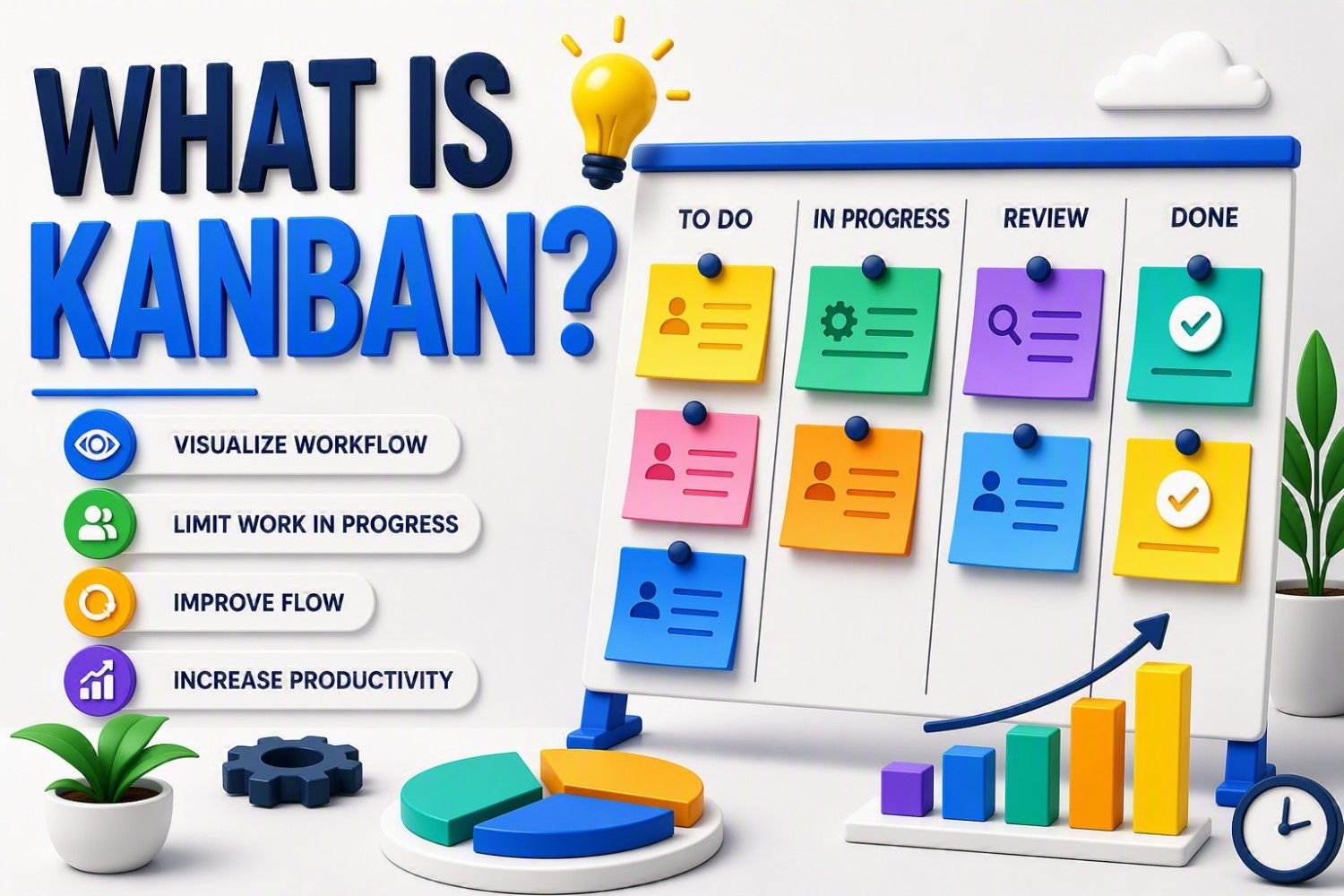
Kanban is a visual workflow management method that helps individuals and teams organize work, identify bottlenecks, and improve productivity. Instead of tracking tasks through long emails or spreadsheets, every piece of work is displayed on a Kanban board and moves through stages such as To Do, In Progress, and Done. This simple visual approach makes it easy to see what needs attention, avoid overloading the team, and keep work moving smoothly.
The word Kanban comes from Japanese and means “visual card” or “signboard.” It was introduced by Toyota as part of its Lean Manufacturing system to improve production flow and reduce waste. Today, the same principles are used across manufacturing, software development, project management, healthcare, marketing, and even personal task management.
One lesson I’ve learned from using Kanban is that improving productivity isn’t always about working harder—it’s about making work visible. Once everyone can clearly see the workflow, problems become easier to solve, priorities become clearer, and continuous improvement happens naturally. That’s why Kanban remains one of the simplest, most practical, and most effective ways to manage work in almost any industry.
Why Kanban is Most Effective Workflow Management Systems
Over the years, I’ve learned that most workflow issues aren’t caused by people working too little—they’re caused by not knowing where the work is getting stuck. In several process improvement projects, we spent hours discussing delays until we mapped the work on a simple Kanban board. Almost immediately, hidden bottlenecks became obvious, priorities were clearer, and conversations shifted from assigning blame to solving problems.
That’s what makes Kanban so effective. It visualizes the entire workflow, allowing everyone to see what needs to be done, what’s currently in progress, and what’s complete. This shared visibility improves communication, reduces unnecessary status meetings, and helps teams focus on moving work forward instead of constantly tracking it.
Another reason I rely on Kanban is its emphasis on finishing work before starting new tasks. By limiting Work-in-Progress (WIP), teams avoid excessive multitasking, stay focused, and deliver higher-quality results in less time. In my experience, productivity improves not because people work harder, but because they work with greater clarity and fewer distractions.
What I appreciate most is that Kanban doesn’t force you to change everything overnight. You can apply it to your existing process, identify small improvements, and build better workflows over time. Whether you’re managing a manufacturing line, software project, marketing campaign, or even personal tasks, the same principle applies: make work visible, improve flow, and continuously learn from the process.
For me, that’s why Kanban remains one of the most practical and effective workflow management systems. It’s simple to implement, flexible enough for any industry, and consistently helps teams reduce bottlenecks, improve collaboration, and deliver work more efficiently.
What is Kanban Board
The first time I used a Kanban board, I wasn’t trying to adopt a new project management system—I simply wanted a better way to see where the work was. Until then, tasks were scattered across emails, spreadsheets, and meeting notes. Everyone was busy, but no one had a complete picture of what was happening. As soon as we put every task on a simple board, the bottlenecks became obvious, priorities were clearer, and the team spent less time asking for updates and more time getting work done.
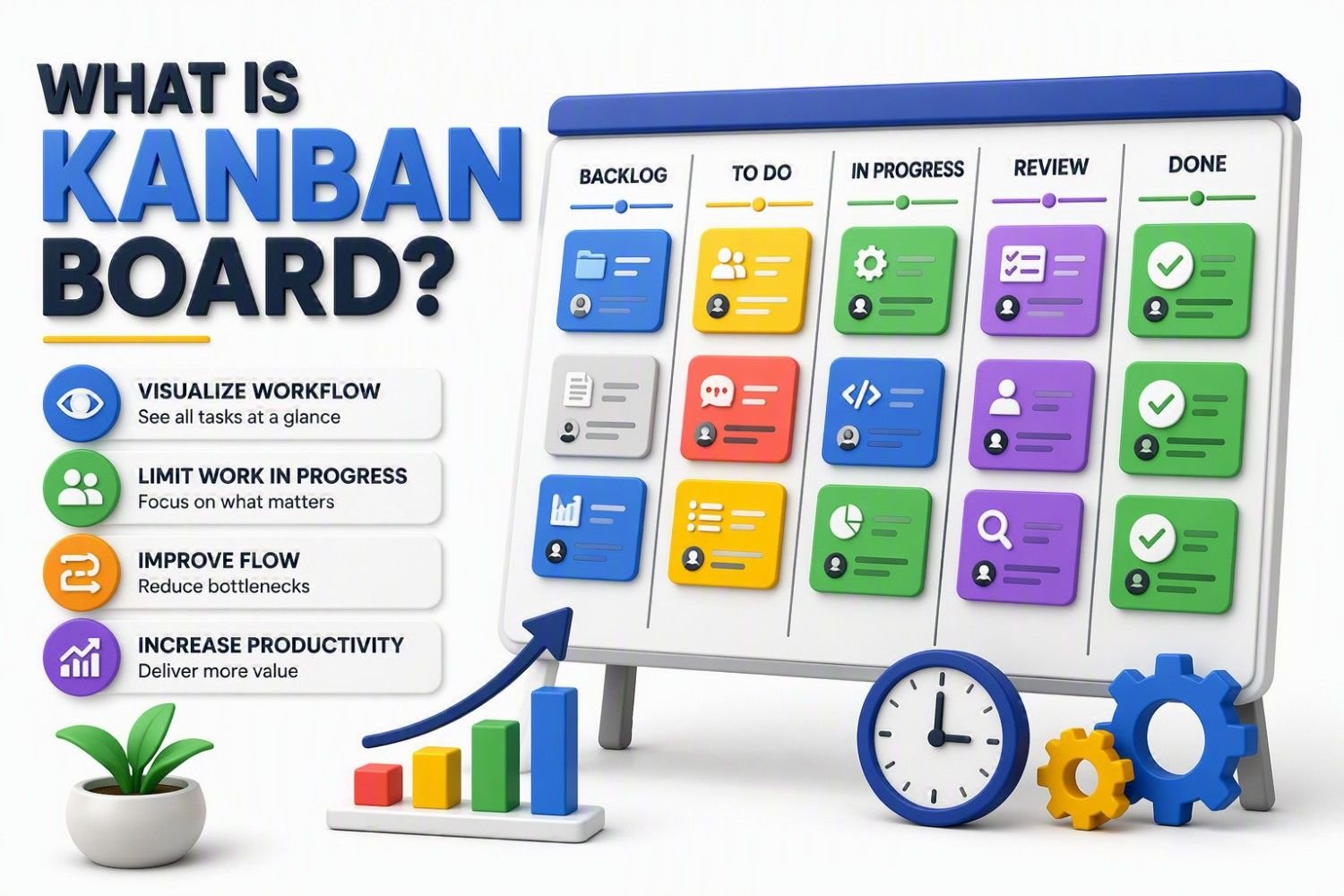
A Kanban board is a visual workflow management tool that helps you organize, track, and manage work from start to finish. It is typically divided into columns such as To Do, In Progress, and Done, with each task represented by a card that moves across the board as work progresses. This simple layout makes it easy to understand the current status of every task at a glance.
What I like most about a Kanban board is that it turns hidden problems into visible ones. Instead of discovering delays after they affect a project, you can quickly spot overloaded stages, blocked tasks, or workflow bottlenecks and address them before they become bigger issues. In my experience, that visibility often improves productivity more than introducing another tool or process.
Whether it’s a whiteboard with sticky notes or a digital board in Jira, Trello, or Azure DevOps, the goal remains the same: make work visible so it can flow smoothly. That’s why a Kanban board has become one of the most practical tools for managing projects, improving collaboration, and delivering work more efficiently across almost every industry.
🎓 Top-Rated Courses & Certifications
Try changing your filters or searching for another course.
How Does a Kanban Board Work?
One of the biggest lessons I’ve learned from leading process improvement projects is that you can’t improve what you can’t see. More than once, my team assumed we had a resource problem, but after mapping the work on a simple Kanban board, we discovered the real issue was a bottleneck in one stage of the process. That single insight changed how we managed work.
A Kanban board works by breaking your workflow into a series of stages, with each task represented by a Kanban card. As work progresses, the card moves from one column to the next—for example, To Do → In Progress → Review → Done. This visual movement gives everyone an instant view of what’s being worked on, what’s waiting, and where work has stalled.
Another feature I rely on is Work-in-Progress (WIP) limits. Rather than allowing the team to start every new request, Kanban encourages finishing current work before pulling in more. In my experience, this simple change reduces multitasking, prevents work from piling up, and improves both quality and delivery speed.
What makes Kanban so effective is that it highlights problems while there’s still time to fix them. If cards begin accumulating in one column, it’s an immediate signal that something is slowing the workflow. Instead of waiting until a deadline is missed, the team can address the bottleneck early and keep work moving.
To me, that’s the real power of a Kanban board. It doesn’t just show what people are working on—it shows how work flows through the process. That visibility leads to better decisions, smoother collaboration, and continuous improvement without adding unnecessary complexity.
Core Elements of a Kanban Board
One mistake I’ve seen teams make is believing that an effective Kanban board needs dozens of columns, colors, and rules. In reality, the best boards I’ve used were often the simplest. They focused on a few essential elements that made work visible and easy to manage. Once those basics were in place, improving the workflow became much easier.
Kanban Cards
Every task is represented by a Kanban card. Each card contains the information needed to complete the work, such as the task name, owner, priority, or due date. As work progresses, the card moves across the board, making progress visible to everyone.
Workflow Columns
Columns represent the different stages of your workflow. A simple board might use To Do, In Progress, and Done, while more detailed workflows can include stages like Review, Testing, or Approval. Well-designed columns help everyone understand exactly where work stands.
Work-in-Progress (WIP) Limits
One feature that has consistently improved productivity in my projects is WIP limits. By limiting how many tasks can be in progress at one time, teams stay focused on finishing work instead of constantly starting new tasks. This simple practice reduces multitasking and exposes bottlenecks much earlier.
Swimlanes (Optional)
When multiple teams or priorities share the same board, swimlanes help organize the work. For example, you might separate Customer Requests, High-Priority Tasks, and Internal Improvements while still keeping everything visible in one place.
Visual Indicators
A good Kanban board should communicate important information instantly. Color labels, blocked-task markers, due dates, priority tags, or icons make it easy to identify urgent work and spot potential issues without reading every card.
Key Takeaway
From my experience, the strength of a Kanban board isn’t in having more features—it’s in making work easy to understand. When these core elements work together, the board becomes more than a task tracker. It becomes a practical tool for improving workflow, reducing bottlenecks, and helping teams deliver work more efficiently through continuous improvement.
📚 Recommended Books for Professionals
Try removing one or more filters.
How to Create a Kanban Board (Step-by-Step)
The first Kanban board I built wasn't in Jira or any project management software—it was a whiteboard with sticky notes. I was surprised by how quickly it changed the team's conversations. Instead of asking, "What's the status of this task?", everyone could see the answer for themselves. That's when I realized a good Kanban board isn't about the tool—it's about making work visible.
Step 1: Map Your Workflow
Start by identifying how work actually moves through your process. For most teams, To Do → In Progress → Review → Done is a good starting point. Keep it simple and reflect your real workflow, not your ideal one.
Step 2: Create Your Board
Turn each workflow stage into a column. You can use sticky notes on a whiteboard or digital tools like Trello, Jira, or Azure DevOps. A clean, easy-to-read board is far more effective than one with too many columns.
Step 3: Add Tasks as Kanban Cards
Create one Kanban card for each task. Include only the details your team needs, such as the task name, owner, priority, and due date. I've found that simple cards are updated more consistently and are easier for everyone to understand.
Step 4: Set Work-in-Progress (WIP) Limits
Decide how many tasks can be worked on at the same time. For example, limit the In Progress column to three tasks. This encourages the team to finish work before starting something new—a small change that often has a big impact on productivity.
Step 5: Move Cards as Work Progresses
As each task advances, move its card to the next column. If cards begin piling up in one stage, you've likely found a bottleneck. In my experience, these visual cues help solve workflow issues long before they become missed deadlines.
Step 6: Review and Improve
A Kanban board isn't something you create once and forget. Review it regularly, discuss what's slowing the workflow, and make small improvements over time. I've found that continuous, incremental changes deliver better results than occasional major process overhauls.
Key Takeaway
Creating a Kanban board is easier than most people think. Start with a simple workflow, visualize every task, limit work in progress, and improve the process as you learn. From my experience, the most successful Kanban boards aren't the most sophisticated—they're the ones that teams use consistently to keep work flowing smoothly and continuously improve how they work.

Lean Six Sigma • Six Sigma • Statistics • Project Management • Artificial Intelligence (AI) • Operations Management • Quality Management
Kanban vs. Scrum: What's the Difference?
One question I've been asked many times is, "Should we use Kanban or Scrum?" After working with manufacturing teams, quality engineers, and project teams, I've learned that there isn't a single right answer. The best framework is the one that fits your workflow—not the one that's most popular.
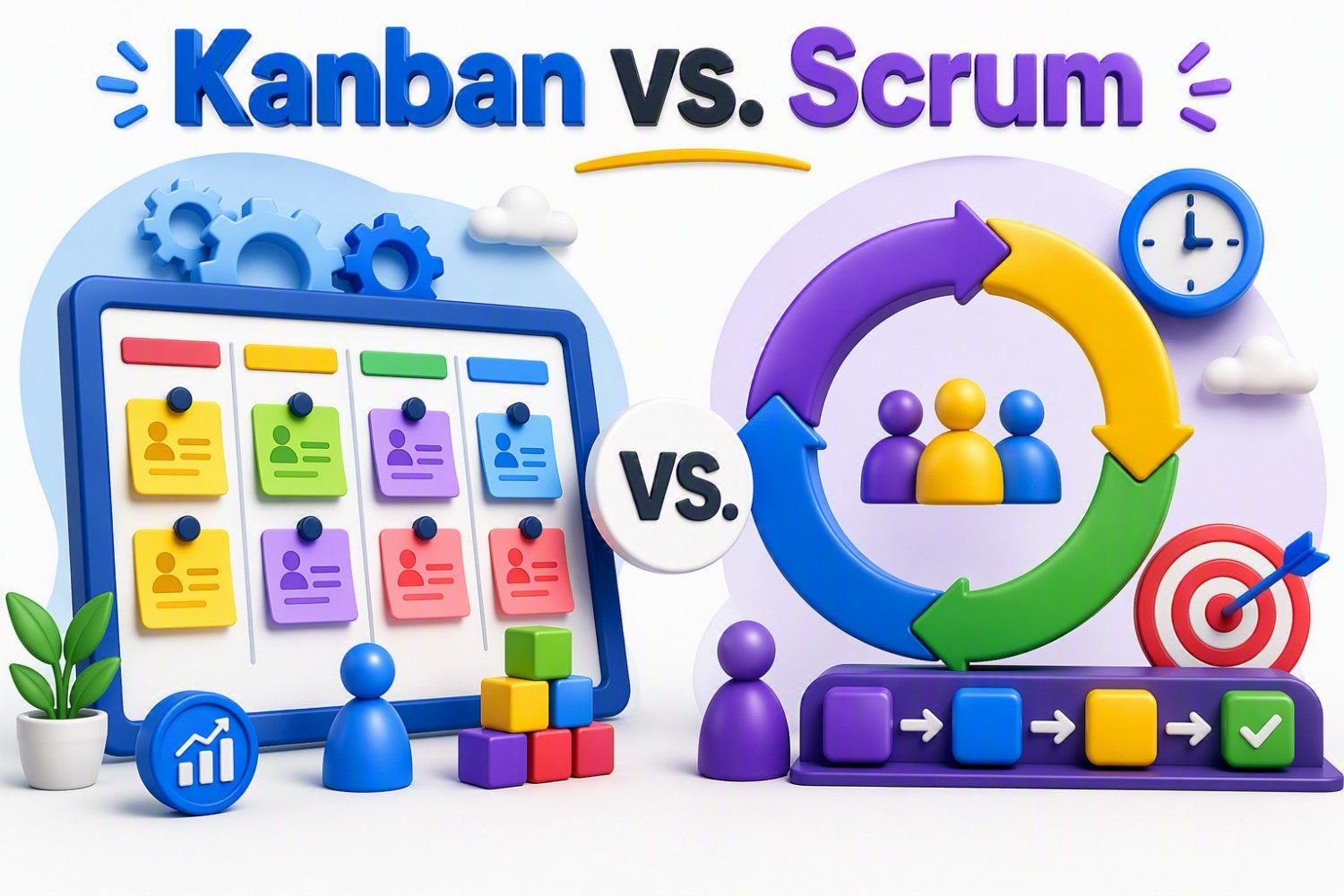
The biggest difference is how work is managed. Kanban uses a continuous flow, where team members pull new work only when they have capacity. Scrum organizes work into fixed Sprints, usually lasting one to four weeks, with a predefined set of tasks that the team commits to completing.
I've found Kanban especially effective in environments where priorities change frequently. Whether it's quality issues, customer requests, or engineering changes, new work can be added without waiting for the next Sprint. Scrum, on the other hand, works well when the goal is to deliver a planned set of features or project milestones within a defined timeframe.
Another key difference is structure. Kanban keeps things lightweight by focusing on visualizing workflow and limiting Work-in-Progress (WIP) to improve flow. Scrum follows a more structured approach with defined roles, Sprint planning, daily stand-ups, reviews, and retrospectives.
Kanban vs. Scrum Comparison
| Feature | 🌱 Kanban | 🔄 Scrum |
|---|---|---|
| Workflow | Continuous flow | Time-boxed sprints |
| Planning | Continuous | Sprint-based |
| Flexibility | High | Moderate |
| Work Management | Pull new work as capacity becomes available | Commit to a defined sprint backlog |
| Focus | Improve workflow and reduce bottlenecks | Deliver sprint goals |
| Best For | Ongoing work with changing priorities | Projects with planned releases |
Which One Should You Choose?
From my experience, Kanban is the better choice for continuous operations such as manufacturing, IT support, quality engineering, maintenance, or content creation, where priorities can change every day. Scrum is better suited for product development projects that benefit from structured planning and predictable delivery cycles.
One important lesson I've learned is that you don't always have to choose one over the other. Many successful teams combine Scrum's planning with Kanban's visual board and WIP limits to create a workflow that is both structured and flexible. In the end, the goal isn't to follow a framework perfectly—it's to build a process that helps your team deliver better results with less confusion and fewer bottlenecks.
Popular Kanban Tools and Software
One of the first questions I get after introducing Kanban is, "Which tool should I use?" My advice is always the same: choose the workflow first, then choose the software. I've implemented Kanban using everything from sticky notes on a whiteboard to enterprise project management platforms. In almost every case, the team's success depended more on how well they managed the workflow than on the tool itself.
Today, there are many excellent Kanban applications, each designed for different needs. Here's a quick comparison of the most popular options.
For beginners, I usually recommend Trello because it's easy to set up and requires very little training. In corporate environments, I've had great success with Microsoft Planner, Jira, and Azure DevOps, especially when teams need collaboration, reporting, and integration with existing business tools. On the manufacturing floor, however, a physical Kanban board is often just as effective because everyone can see and update it instantly.
From my experience, the best Kanban tool is the one your team will use consistently. A simple board that everyone updates every day is far more valuable than an advanced platform packed with features that nobody uses. Start with a tool that matches your team's size and workflow, keep the board simple, and improve the process over time. Kanban succeeds because of visibility and continuous improvement—not because of the software behind it.
Common Mistakes to Avoid When Using Kanban
I've seen teams say, "Kanban doesn't work." In most cases, Kanban wasn't the problem—the implementation was. The biggest improvements I've witnessed came from teams that kept their boards simple, updated them consistently, and used them to improve workflow instead of just tracking tasks. Here are the mistakes I see most often.
Treating Kanban as a To-Do List
A Kanban board is more than a place to store tasks. Its real purpose is to visualize workflow and expose delays. If you're only moving cards without asking "Where is work getting stuck?", you're missing the biggest benefit of Kanban.
Ignoring Work-in-Progress (WIP) Limits
This is probably the most common mistake. Without WIP limits, teams start too many tasks and finish too few. One simple rule has consistently improved productivity in my projects: stop starting, start finishing. Keeping fewer tasks in progress helps work move faster and improves quality.
Making the Board Too Complex
I've seen boards with so many columns that people no longer knew where to place a task. Start with a simple workflow such as To Do → In Progress → Review → Done. Add more stages only when they genuinely improve visibility.
Not Updating the Board
A Kanban board is only useful if it reflects reality. If completed tasks remain "In Progress" or new work isn't added, people quickly lose confidence in the board. Updating it should become part of the team's daily routine.
Ignoring Bottlenecks
One of Kanban's greatest strengths is that it makes workflow problems impossible to hide. If cards keep piling up in one column, don't ignore them—investigate the cause. In my experience, solving one bottleneck often improves the entire workflow.
Focusing on Activity Instead of Flow
Busy teams aren't always productive teams. I've worked with groups that started dozens of tasks but completed very few. Kanban shifts the focus from how much work has started to how much work is actually finished, which is what ultimately creates value.
Key Takeaway
From my experience, Kanban succeeds when teams keep it simple and use it as a tool for continuous improvement, not just task management. Respect WIP limits, keep the board up to date, and pay attention to bottlenecks. The goal isn't to make people look busy—it's to help work flow smoothly from start to finish.
Real-World Case Study: How Kanban Improved Productivity
One of the biggest reasons I trust Kanban is because I've seen its impact firsthand. During a manufacturing quality improvement project, our team was struggling with delayed engineering change requests. Everyone was working hard, yet projects kept slipping, and weekly meetings always ended with the same question: "Where is the work getting stuck?" The problem wasn't effort—it was that no one had a clear view of the workflow.
Instead of introducing new software, we created a simple Kanban board with the stages Request → Review → Approval → Implementation → Completed. Every request became a Kanban card. Within days, the root cause was obvious. Most of the cards were piling up in the Approval stage. The bottleneck had existed for months, but it had been hidden in emails and spreadsheets.
Once we could see the problem, the solution was straightforward. We introduced Work-in-Progress (WIP) limits, assigned backup reviewers, and spent a few minutes each morning reviewing the board. We didn't hire more people or redesign the entire process—we simply improved the flow of work.
Results
- Faster processing of engineering change requests.
- Fewer approval delays and workflow bottlenecks.
- Better team visibility and accountability.
- Less time spent in status meetings.
- Improved productivity without adding extra resources.
Key Takeaway
The biggest lesson I learned was that Kanban doesn't make teams productive by making them work harder—it makes them productive by making the workflow visible. Once everyone can clearly see where work is slowing down, the right improvements become much easier to identify. In my experience, that visibility is what makes Kanban such a powerful tool for continuous improvement.
Lean Six Sigma • Six Sigma • Statistics • Project Management • Artificial Intelligence (AI) • Operations Management • Quality Management
Frequently Asked Questions (FAQs)
- What is Kanban?
Kanban is a visual workflow management method that helps teams organize work, reduce bottlenecks, and improve productivity. - What is a Kanban Board?
A Kanban board is a visual tool that displays tasks in different workflow stages such as To Do, In Progress, and Done. - What does Kanban mean?
Kanban is a Japanese word meaning "visual signal" or "signboard." - Is Kanban Agile?
Yes, Kanban supports Agile principles by focusing on flexibility, continuous improvement, and customer value. - How does a Kanban Board work?
Tasks move across workflow columns as work progresses, providing real-time visibility into project status. - How do I create a Kanban Board?
Create workflow columns, add tasks as cards, set WIP limits, and move cards as work progresses. - What are the main components of a Kanban Board?
The key components are cards, columns, WIP limits, swimlanes, and workflow policies. - What are the four principles of Kanban?
Start with the current process, pursue incremental change, respect existing roles, and encourage leadership at all levels. - What are WIP limits in Kanban?
Work-in-Progress (WIP) limits restrict the number of active tasks to improve focus and workflow. - Why are WIP limits important?
They reduce multitasking, prevent overload, and help teams complete work faster. - What is the difference between Kanban and Scrum?
Kanban uses continuous workflow, while Scrum organizes work into time-boxed sprints. - Which is better: Kanban or Scrum?
It depends on your needs; Kanban suits continuous work, while Scrum works well for planned project delivery. - Can Kanban and Scrum be used together?
Yes, many teams use a hybrid approach called Scrumban. - What industries use Kanban?
Kanban is used in manufacturing, software development, healthcare, marketing, education, and project management. - How does Kanban improve productivity?
It improves visibility, reduces bottlenecks, limits multitasking, and keeps work flowing smoothly. - What are the benefits of Kanban?
Benefits include improved workflow visibility, faster delivery, better collaboration, and continuous improvement. - What is a Kanban card?
A Kanban card represents a task, work item, or project moving through a workflow. - What is a bottleneck in Kanban?
A bottleneck occurs when tasks accumulate in one stage because work is moving slower than expected. - Is Kanban only for software development?
No, Kanban originated in manufacturing and is now used across many industries. - What are the most popular Kanban tools?
Popular tools include Trello, Jira, Microsoft Planner, Asana, ClickUp, and Monday.com. - What metrics are used in Kanban?
Common metrics include Lead Time, Cycle Time, Throughput, Flow Efficiency, and Work-in-Progress. - What is Lead Time in Kanban?
Lead Time measures how long it takes for a task to go from request to completion. - What is Cycle Time in Kanban?
Cycle Time measures how long a task takes to complete once work starts. - What are common Kanban mistakes?
Common mistakes include ignoring WIP limits, overcomplicating the board, and failing to update tasks regularly. - Can I use Kanban for personal productivity?
Yes, Kanban is excellent for managing personal tasks, goals, study plans, and daily activities. - Does Kanban require software?
No, you can use sticky notes and a whiteboard or any digital Kanban tool. - What is the biggest advantage of Kanban?
Its biggest advantage is making work visible, helping teams identify and solve workflow issues quickly. - What is Kanban in manufacturing?
Kanban is a pull-based system used to control inventory and production while minimizing waste. - How long does it take to implement Kanban?
A basic Kanban board can be created in a few hours and improved over time. - Why is Kanban still popular today?
Kanban remains popular because it is simple, flexible, easy to adopt, and highly effective.
Conclusion
Kanban is much more than a task management tool—it's a simple yet powerful system for visualizing work, improving workflow, and increasing productivity. By making tasks visible on a Kanban board, teams can quickly identify bottlenecks, reduce multitasking, and focus on completing work more efficiently. Whether you're managing a manufacturing process, software project, business operation, or even personal tasks, Kanban provides a practical framework that adapts to almost any workflow.
Throughout my career in quality, manufacturing, and process improvement, I've found that many productivity challenges are not caused by a lack of effort but by a lack of visibility. Kanban solves this problem by showing exactly where work stands and where delays occur. Even a simple Kanban board can transform the way teams collaborate, prioritize tasks, and continuously improve their processes.
The best part is that you don't need expensive software or extensive training to get started. Begin with a basic Kanban board, visualize your workflow, limit work in progress, and focus on improving flow over time. Small, consistent improvements can lead to significant gains in efficiency, quality, and customer satisfaction.
In a world where teams are often overwhelmed by competing priorities, Kanban offers a refreshingly simple approach: make work visible, manage flow, and continuously improve. That's why, decades after its introduction at Toyota, Kanban remains one of the most effective and widely used workflow management systems in the world.
Continue Your Learning Journey
Learning is a continuous process. Explore related topics, practical guides, tools, calculators, templates, and learning resources to expand your knowledge and develop new skills.
Choose a category below to explore practical tutorials, tools, calculators, templates, case studies, and learning resources.
Recommended Learning Resources
Expert-led courses to build practical skills, earn credentials, and advance your career.
Recommended professional books, certification guides, and practical study resources.
Ready-to-use templates, checklists, guides, and workbooks for practical applications.
Interactive calculators for statistics, quality, engineering, analysis, and decision-making.
Interactive Z, t, Chi-Square, and F tables with critical values and distribution curves.
Discover practical tutorials, case studies, and professional resources across Quality, Lean Six Sigma, Project Management, Statistics, AI, and Data Analytics.
Published: August 23, 2024
Last Updated: September 18, 2026